1.1
Convention version 1.1 has the following changes:
The
minamountandmaxamountelements were renamed. Details.New elements
tomin,tomaxwere introduced. Details.A second fee can now be added. Details.
Params received a format update. Details.
Amount-based exchange rates are now supported. Details.
Preparations for the adoption of strong typing began.
Preparations for easy transition to JSON began.
Note
Version 1.1 is backward compatible with 1.0.
A sample EREF:
<?xml version="1.0" encoding="UTF-8"?>
<rates xmlns:xsi="http://www.w3.org/2001/XMLSchema-instance" xsi:noNamespaceSchemaLocation="https://docs.bestchange.biz/schema/1.1.xsd">
    <item>
        <from>WMZ</from>
        <to>WMB</to>
        <in>1</in>
        <out>30.593562</out>
        <amount>572962.42</amount>

        <frommin>3</frommin>
        <frommax>1000</frommax>

        <tomin>10</tomin>
        <tomax>15000</tomax>

        <manual/>
        <reg/>

        <step frommin="10" frommax="20">
            <in>1</in>
            <out>40</out>
            <fromfee>1%</fromfee>
            <tofee>1%</tofee>
            <manual/>
        </step>

    </item>

</rates>
XML Schema (XSD)
Version 1.1 supports the XML Schema. It is recommended that you create the export file following the standards specified in 1.1.xsd.
The exchange rate export file can contain attributes refers to the XML Schema.
<?xml version="1.0" encoding="UTF-8"?>
<rates xmlns:xsi="http://www.w3.org/2001/XMLSchema-instance"
       xsi:noNamespaceSchemaLocation="https://docs.bestchange.biz/schema/1.1.xsd"
>
</rates>
You can check whether your export file complies with the standards using the following tool:
The order of elements
The rules are added to the XML Schema 1.1.xsd in the same order as the elements.
Note
This order of the elements is advisory rather than mandatory.
The order of the elements inside item
The allowed count is given in the brackets.
from (1)
to (1)
in (1)
out (1)
amount (1)
tomin (0..1)
tomax (0..1)
fromfee (0..2)
tofee (0..2)
delay (0..1)
floating (0..1)
atm (0..1)
card2card (0..1)
cardverify (0..1)
delivery (0..1)
juridical (0..1)
manual (0..1)
otherin (0..1)
otherout (0..1)
reg (0..1)
verifying (0..1)
city (0..1)
step (0..16)
minamount (0..1)
maxamount (0..1)
param (0..1)
The order of the elements inside step
in (0..1)
out (0..1)
amount (0..1)
fromfee (0..2)
tofee (0..2)
delay (0..1)
floating (0..1)
atm (0..1)
card2card (0..1)
cardverify (0..1)
delivery (0..1)
juridical (0..1)
manual (0..1)
otherin (0..1)
otherout (0..1)
reg (0..1)
verifying (0..1)
city (0..1)
Renaming
frommin, frommax (minamount, maxamount)
The minamount and maxamount elements that are used to set the minumum and maximum amounts allowed for a
single order will receive self-explanatory names.
minamount will become frommin
maxamount will become frommax
Note
Legacy elements minamount and maxamount will still be supported in Version 1.1.
Required elements:
frommin (or minamount)
frommax (or maxamount)
Note
In a trading pair that has both elements — frommin and minamount, frommin has the priority.
In a trading pair that has both elements — frommax and maxamount, frommax has the priority.
tomin, tomax
Limits for the target amount will also be enabled.
If the exchangers has target amount limits (the to currency), these must be specified as the values of the tomin and tomax elements.
Fees
Explicit indication of the fee type
The new type attribute allows to explicit specify the fee type.
If the attribute is given, it’s value will have the priority.
If it is not specified, the cost of the fee will be calculated in the usual way.
Supported fee types:
abs— absolute fee; is used by default.%— percentage fee.
A percentage fee (%) example:
<item>
    <fromfee>5.5%</fromfee>
</item>
<item>
     <fromfee type="%">5.5</fromfee>
 </item>
An absolute fee example:
<item>
    <fromfee>5.5</fromfee>
</item>
<item>
    <fromfee type="abs">5.5</fromfee>
</item>
Double fee. Fixed and percentage
Additional fees fromfee and tofee can now be added twice for each of the currencies in the trading pair.
It will enable correct presentation or complex fees that have a fixed part and a percentage part.
<item>
    <!-- percentage -->
    <fromfee type="%">2.1</fromfee>
    <!-- fixed -->
    <fromfee>50</fromfee>

    <!-- percentage -->
    <tofee type="%">3</tofee>
    <!-- fixed -->
    <tofee>50</tofee>
</item>
Deprecated since version 1.1: Starting from 1.1, we advise you against using the % character to specify the value of a percentage fee.
The attribute type is preferable.
Currency code in fixed fees no longer required
Specifying the currency code will not be required for fixed fees.
<!-- legacy way -->
<fromfee>150 RUB</fromfee>
<!-- modern way -->
<fromfee>150</fromfee>
The code will be assumed to correspond with that of the currencyspecified in the from element for the fromfee
and the to element for the tofee.
If a currency mismatch is detected in the elements frommin, frommax, tomin, tomax, fromfee, tofee,
the rate will be marked as incorrect. Incorrect rates are not displayed on the BestChange website.
An example of mismatched currency codes:
<from>USDT</to>
<to>CASHEUR</to>
<!-- Available only: USDT -->
<frommin>0.001 AUD</frommin>
<frommax>0.001 EUR</tofee>
<fromfee>0.001 PHP</tofee>
<!-- Available only: EUR -->
<tomin>0.001 USDT</tomin>
<tomax>0.001 USD</tomax>
<tofee>0.001 ETH</tofee>
Percentage fee limits
Fees will be extended with optional attributes min, max.
The min and max attributes are only applicable to percentage fees.
<item>
    <fromfee type="%" min="50" max="500">1.5</fromfee>
    <tofee type="%" min="50" max="500">1.5</tofee>
</item>
The min and max attributes set the upper and lower fee limits.
If the fee amount falls outside the limits, it will be adjusted to the min or max value.
Note
The currency code for the upper and lower fee limits will be assumed to correspond with that of the currency
specified in the from or to element, respectively.
Additional fee strategy (set)
The set attribute allows to specify the percentage type: regular or reverse.
<item>
    <fromfee min="50" max="500" set="up">1.5%</fromfee>
    <tofee min="50" max="500" set="down">1.5%</tofee>
</item>
downReverse percentage.
The legacy BestChange website only supports reverse percentage calculations for situations when a customer enters an amount on an exchanger’s website, and after that, 1.5% are subtracted from the amount.
Sample calculations: 100 — 1.5 = 98.5 (the amount that will be exchanged).
upRegular percentage is the default value; it is used when a customer enters an amount on the exchanger’s website, and then 1.5% are added to it. This is the fee charged by payment systems for money transfers. As a result, the exchanged amount is bigger than the initial one.
Sample calculations: 100 + 1.5 = 101.5 (to be paid by the customer)
Then, 101.5 / 100 = 1.015 (1.5%)
Params
Element params
Params must be separate elements within the item element.
The param element will be supported in the minor versions of the convention.
Separating values into nodes
Version 1.0
<item>
    <from>WMZ</from>
    <to>WMB</to>
    <in>1</in>
    <out>30.593562</out>
    <param>manual, juridical, verifying, cardverify, card2card, reg</param>
</item>
Version 1.1
<item>
    <!-- ... -->
    <card2card/>
    <cardverify/>
    <juridical/>
    <manual/>
    <reg/>
    <verifying/>
</item>
Explicitly specifying param value
Params previously contained inside the param element are Boolean-type attributes (true/false).
If a param has no specified value, its default value is true.
The examples below are identical:
<item>
    <!-- ... -->
    <param>manual, juridical, verifying, cardverify, otherin, otherout, reg, card2card, delivery, atm</param>
</item>
<item>
    <!-- ... -->
    <atm/>
    <card2card/>
    <cardverify/>
    <delivery/>
    <juridical/>
    <manual/>
    <otherin/>
    <otherout/>
    <reg/>
    <verifying/>
</item>
<item>
    <!-- ... -->
    <atm>true</atm>
    <card2card>true</card2card>
    <cardverify>true</cardverify>
    <delivery>true</delivery>
    <juridical>true</juridical>
    <manual>true</manual>
    <otherin>true</otherin>
    <otherout>true</otherout>
    <reg>true</reg>
    <verifying>true</verifying>
</item>
You can specify there is no param. This is only applicable to amount-based exchange rates.
<item>
    <!-- ... -->
    <atm>false</atm>
    <card2card>false</card2card>
    <cardverify>false</cardverify>
    <delivery>false</delivery>
    <juridical>false</juridical>
    <manual>false</manual>
    <otherin>false</otherin>
    <otherout>false</otherout>
    <reg>false</reg>
    <verifying>false</verifying>
</item>
floating
The floating exchange rate param is now more transparent.
New attributes added:
minutesType: integer
This attribute specifies the duration of the fixed exchange rate (in minutes).
Default value: 0
percentType: float
The floating rate will be fixed until the actual market rate changes by a certain percentage.
Default value: 0
<floating minutes="15"/>
Divergence from the market rate is not taken into account.
<floating percent="0.5"/>
The rate will be fixed until the market rate changes by at least 0.5%
<floating minutes="15" percent="0.5"/>
The exchange rate is fixed for 15 minutes. If the market rate changes by at least 0.5% during that time, the fixation will be cancelled.
<floating minutes="0" percent="0"/>
<!-- or -->
<floating/>
<!-- or -->
<floating>0</floating>
The legacy format will be supported in minor releases.
Note
Attributes have the priority. If you specify both the attributes and the value in the node, the values of the attributes will be prioritized.
<!-- example 1 -->
<floating minutes="0" percent="0">0.05%</floating>
<!-- will be recognized as -->
<floating/>

<!-- example 2 -->
<floating minutes="15" percent="15">0.20%</floating>
<!-- will be recognized as -->
<floating minutes="15" percent="15"/>
Note
The percent value will be rounded to 4 decimal places.
Step rates
The challenge
The EREF must only contain a single instance of each Trading pair. Duplicates will be ignored.
<!-- This rate will be displayed on the BestChange website -->
<item>
    <from>WMZ</from>
    <to>WMB</to>
    <!-- ... -->
</item>

<!-- This rate will be recognized as duplicate and ignored -->
<item>
    <from>WMZ</from>
    <to>WMB</to>
    <!-- ... -->
</item>
The exchanger wants to charge an in fee that will depend on the amount.
Example:
1 to 100 — 1% fee
101 to 200 — 0.7% fee
Version 1.0 does not allow specifying several rates.
 <!-- This rate will be displayed on the BestChange website -->
 <item>
     <from>USD</from>
     <to>RUB</to>
     <in>1</in>
     <out>31</out>
     <amount>1000</amount>
     <frommin>1</frommin>
     <frommax>101</frommax>
     <fromfee type="%">1</fromfee>
 </item>

 <!-- This rate will be recognized as duplicate and ignored -->
<item>
     <from>USD</from>
     <to>RUB</to>
     <in>1</in>
     <out>31</out>
     <amount>1000</amount>
     <frommin>101</frommin>
     <frommax>200</frommax>
     <fromfee type="%">0.7</fromfee>
 </item>
Solution
Version 1.1 introduces a new collection of elements called step.
<item>
    <!-- exchange rate base -->
    <from>USD</from>
    <to>RUB</to>
    <in>1</in>
    <out>31</out>
    <frommin>1</frommin>
    <frommax>1000</frommax>
    <amount>1000</amount>

    <!-- step collection -->
    <step frommin="1" frommax="100">
         <fromfee type="%">1</fromfee>
    </step>
    <step frommin="101" frommax="200">
         <fromfee type="%">0.7</fromfee>
    </step>

</item>
In this case, we have three variations of one exchange rate.
<item>
    <from>USD</from>
    <to>RUB</to>
    <in>1</in>
    <out>31</out>
    <amount>1000</amount>
    <frommin>1</frommin>
    <frommax>101</frommax>
    <fromfee type="%">1</fromfee>
</item>
<item>
    <from>USD</from>
    <to>RUB</to>
    <in>1</in>
    <out>31</out>
    <amount>1000</amount>
    <frommin>101</frommin>
    <frommax>200</frommax>
    <fromfee type="%">0.7</fromfee>
</item>
<item>
    <from>USD</from>
    <to>RUB</to>
    <in>1</in>
    <out>31</out>
    <amount>1000</amount>
    <frommin>1</frommin>
    <frommax>1000</frommax>
</item>
In other cases, the exchange rate base will be applied.
Note
See a detailed sample calculation below
Each step element must have the frommin and frommax attributes which set the limits of the amount that
can be accepted for exchange. If the amount sent by the customer falls inside the frommin <= N <= frommax limits
of a certain step, the base exchange rate will be updated using the elements from inside the step.
The applicable rule will be determined based on the attributes:
fromminType: float
Required.
The amount given by the customer is greater than or equal to (>=) the value of the specified attribute.
frommin_eqType: boolean (true/false)
Changes the operator of the
frommin.By default: true (>=). If set to false, the operator changes to
>.fromaxType: float
Required.
The amount given by the customer is less than or equal to (<=) the value of the specified attribute.
frommax_eqType: boolean (true/false)
Changes the operator of the
frommax.By default: true (<=). If set to false, the operator changes to
<.
Note
The minimum number of steps is 0.
The maximum number of steps is 16.
frommin_eq frommax_eq attributes
By default, the ranges are inclusive (>=, <=). N >= frommin N <= frommax.
<item>
    <!-- ... -->

    <!-- applies if the client entered a value (N) that matches the rule 0 <= N <= 10 -->
    <step frommin="0" frommax="10"><!-- ... --></step>
    <!-- applies if the client entered a value (N) that matches the rule 11 <= N <= 20 -->
    <step frommin="11" frommax="20"><!-- ... --></step>
    <!-- applies if the client entered a value (N) that matches the rule 21 <= N <= 100 -->
    <step frommin="21" frommax="100"><!-- ... --></step>
</item>
Если вам нужны границы диапазона без включения (>, <), то используйте атрибуты frommin_eq и frommax_eq.
По умолчанию эти атрибуты равны true (с включением).
<item>
    <!-- ...  -->

    <!-- applies if the client entered a value (N) that matches the rule 0 < N < 10 -->
    <step frommin="1" frommin_eq="false" frommax="10" frommax_eq="false"/>
    <!-- applies if the client entered a value (N) that matches the rule 11 < N < 20 -->
    <step frommin="11" frommin_eq="false" frommax="20" frommax_eq="false"/>
    <!-- applies if the client entered a value (N) that matches the rule 21 < N < 100 -->
    <step frommin="21" frommin_eq="false" frommax="100"/>
</item>
Note
If the limits of the ranges overlap, the exchange rate will be flagged as containing errors.
Available elements in step
Exchange rate recalculation:
in
out
amount
Additional fees:
fromfee
tofee
Params in v.1.1:
Exchange rate base: frommin frommax
The exchange rate base must contain frommin and frommax.
These elements set to overall range of the exchange rate.
The ranges set in step elements must not fall outside the limits of the exchange rate base; otherwise they will
be cut off by parser software on our side.
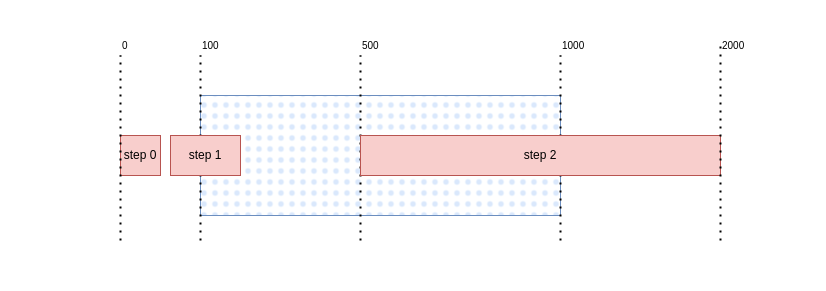
<item>
    <!-- exchange rate base -->
    <from>USD</from>
    <to>RUB</to>
    <in>1</in>
    <out>31</out>
    <frommin>100</frommin>
    <frommax>1000</frommax>
    <amount>10000</amount>

    <!-- step0: will be ignored -->
    <step frommin="1" frommax="50">
         <fromfee type="%">1</fromfee>
    </step>
    <!-- step1: frommin will be cut off -->
    <step frommin="51" frommax="200">
         <fromfee type="%">0.7</fromfee>
    </step>
    <!-- step2: frommax will be cut off  -->
    <step frommin="500" frommax="2000">
         <fromfee type="%">0.5</fromfee>
    </step>

</item>
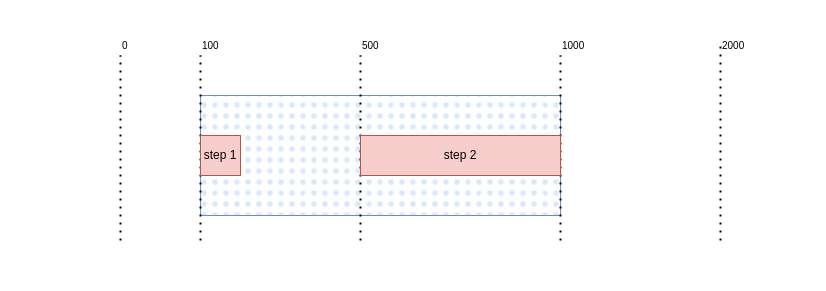
<item>
    <!-- exchange rate base -->
    <from>USD</from>
    <to>RUB</to>
    <in>1</in>
    <out>31</out>
    <frommin>100</frommin>
    <frommax>1000</frommax>
    <amount>10000</amount>

    <step frommin="100" frommax="200">
         <fromfee type="%">0.7</fromfee>
    </step>
    <step frommin="500" frommax="1000">
         <fromfee type="%">0.5</fromfee>
    </step>

</item>
Params
The step elements only support params of the new type.
Overriding
If you need non-inclusive operators (>, <), use frommin_eq and frommax_eq. Their default value is true (inclusive).
 <item>
    <from>WMZ</from>
    <to>WMB</to>
    <in>1</in>
    <out>30</out>
    <amount>572962.42</amount>
    <manual/>

    <step frommin="11" frommax="20">
        <manual>false</manual>
    </step>

</item>
If the amount given by the customer falls within the [11, 20] range, the manual param will not be displayed in the exchange rate.
 <item>
    <from>WMZ</from>
    <to>WMB</to>
    <in>1</in>
    <out>30</out>
    <amount>572962.42</amount>
</item>
 <item>
    <from>WMZ</from>
    <to>WMB</to>
    <in>1</in>
    <out>30</out>
    <amount>572962.42</amount>
    <manual>false</manual>
</item>
Additional fee
Overriding
 <item>
    <from>USD</from>
    <to>RUB</to>
    <in>1</in>
    <out>31</out>
    <amount>1000</amount>

    <fromfee>5</fromfee>
    <tofee>5</tofee>

    <step frommin="1" frommax="100">
        <fromfee>5</fromfee>
        <tofee>5</tofee>
    </step>
    <step frommin="101" frommax="200">
        <!-- no fee -->
        <fromfee>0</fromfee>
        <tofee>0</tofee>
    </step>

</item>
A detailed example of how an amount-based exchange rate works
Below is a detailed description of the process, as it will change for the client, depending on the amount given.
<item>
    <from>WMZ</from>
    <to>WMB</to>
    <in>1</in>
    <out>30</out>
    <amount>572962.42</amount>
    <fromfee>10</fromfee>
    <tofee>10</tofee>
    <verifying/>

    <!-- step1 -->
    <!-- 0 < in_value <= 10 -->
    <!-- if the frommin value is not specified in the first step, the default value will be substituted: 0  -->
    <step frommax="10">
        <in>1</in>
        <out>40</out>
        <!-- exchange rate base overriding -->
        <fromfee>1%</fromfee>
        <tofee>1%</tofee>
        <manual/>
    </step>

    <!-- step2 -->
    <!-- 11 <= in_value <= 20 -->
    <step frommin="11" frommax="20">
        <fromfee>0.7%</fromfee>
        <tofee>0.7%</tofee>
        <!-- disposing of the exchange rate base param -->
        <verifying>false</verifying>
    </step>

    <!-- step3 -->
    <!-- 21 <= in_value < 30 -->
    <step frommin="21" frommax="30" frommax_eq="false">
        <fromfee>0.5%</fromfee>
        <tofee>0.5%</tofee>
    </step>

    <!-- step4 -->
    <!-- 30 < in_value < 51 -->
    <step frommin="30" frommin_eq="false" frommax="51" frommax_eq="false">
        <tofee>0.3%</tofee>
        <fromfee>0.3%</fromfee>
    </step>

    <!-- the range from 51 to 2,000 does not appear, i.e. the user will not see the rates of this exchanger if the amount given is falls within the range from 31 to 999 WMZ -->

    <!-- step5 -->
    <!--  applies from 2,000 to infinity (well, actually up to 2147483647 (sign int)) -->
    <step frommin="2000">
        <fromfee>10%</fromfee>
        <tofee>10%</tofee>
    </step>

</item>
1 WMZ - step1
A customer wants to sell 1 WMZ. According to the amount-based rule, the exchange rate will appear in the following way:
<item>
    <from>WMZ</from>
    <to>WMB</to>
    <in>1</in>
    <out>40</out>
    <amount>572962.42</amount>
    <fromfee>1%</fromfee>
    <tofee>1%</tofee>
    <manual/>
</item>
<item>
    <from>WMZ</from>
    <to>WMB</to>
    <in>1</in>
    <out>30</out>
    <amount>572962.42</amount>
    <fromfee>10</fromfee>
    <tofee>10</tofee>
    <verifying/>
</item>
10 WMZ - step1
The same as in the previous example, because <step frommax="10"> should be interpreted as <step frommax="less than or equal to 10">
11,12,13,14,15,16,17,18,19,20 WMZ - step2
Here, the following rule is applied: <step frommin="11" frommax="20">.
Please note that the verifying param has disappeared.
<item>
    <from>WMZ</from>
    <to>WMB</to>
    <in>1</in>
    <out>30</out>
    <amount>572962.42</amount>
    <fromfee>0.7%</fromfee>
    <tofee>0.7%</tofee>
</item>
<item>
    <from>WMZ</from>
    <to>WMB</to>
    <in>1</in>
    <out>30</out>
    <amount>572962.42</amount>
    <fromfee>10</fromfee>
    <tofee>10</tofee>
    <verifying/>
</item>
21,22,23,24,25,26,27,28,29 WMZ - step3
In this case, the following rule is applied: <step frommin="21" frommax="30" frommax_eq="false">.
<item>
    <from>WMZ</from>
    <to>WMB</to>
    <in>1</in>
    <out>30</out>
    <amount>572962.42</amount>
    <fromfee>0.5%</fromfee>
    <tofee>0.5%</tofee>
    <verifying/>
</item>
<item>
    <from>WMZ</from>
    <to>WMB</to>
    <in>1</in>
    <out>30</out>
    <amount>572962.42</amount>
    <fromfee>10</fromfee>
    <tofee>10</tofee>
    <verifying/>
</item>
Note
Please note that a non-inclusive range is used (frommax_eq). In this case, the rule is not applied to the value
of 30.
30 WMZ - no step
None of the rules can be applied to 30, because the adjacent rules <step frommin="21" frommax="30" frommax_eq="false">
and <step frommin="30" frommin_eq="false" frommax="51" frommax_eq="false"> do not include this value.
31-50.999 WMZ
<item>
    <from>WMZ</from>
    <to>WMB</to>
    <in>1</in>
    <out>30</out>
    <amount>572962.42</amount>
    <fromfee>0.3%</fromfee>
    <tofee>0.3%</tofee>
    <verifying/>
</item>
<item>
    <from>WMZ</from>
    <to>WMB</to>
    <in>1</in>
    <out>30</out>
    <amount>572962.42</amount>
    <fromfee>10</fromfee>
    <tofee>10</tofee>
    <verifying/>
</item>
51-2000 WMZ
There is no rule that can be applied to this range, so we will use the contents of the item element without
overwriting the values.
<item>
    <from>WMZ</from>
    <to>WMB</to>
    <in>1</in>
    <out>30</out>
    <amount>572962.42</amount>
    <fromfee>10</fromfee>
    <tofee>10</tofee>
    <verifying/>
</item>
<item>
    <from>WMZ</from>
    <to>WMB</to>
    <in>1</in>
    <out>30</out>
    <amount>572962.42</amount>
    <fromfee>10</fromfee>
    <tofee>10</tofee>
    <verifying/>
</item>
2001… WMZ
For all the amounts greater than or equal to 2,000.
<item>
    <from>WMZ</from>
    <to>WMB</to>
    <in>1</in>
    <out>30</out>
    <amount>572962.42</amount>
    <fromfee>10%</fromfee>
    <tofee>10%</tofee>
    <verifying/>
</item>
<item>
    <from>WMZ</from>
    <to>WMB</to>
    <in>1</in>
    <out>30</out>
    <amount>572962.42</amount>
    <fromfee>10</fromfee>
    <tofee>10</tofee>
    <verifying/>
</item>
Full example
<?xml version="1.0" encoding="UTF-8"?>
<rates xmlns:xsi="http://www.w3.org/2001/XMLSchema-instance"
       xsi:noNamespaceSchemaLocation="https://docs.bestchange.biz/schema/1.1.xsd"
>

    <!-- common example -->
    <item>
        <!-- 1 WMZ to 30.593562 WMX -->
        <from>WMZ</from>
        <to>WME</to>
        <in>1</in>
        <out>0.92</out>
        <!-- WME reserve at the exchanger -->
        <amount>300</amount>

        <!-- The client can exchange 3 to 1,000 WMZ in one transaction -->
        <frommin>3</frommin>
        <frommax>1000</frommax>

        <!-- The exchanger can give 10 to 15,000 WME units per transaction. -->
        <tomin>10</tomin>
        <tomax>15000</tomax>
    </item>

    <!-- Fee v1.0 -->
    <item>
        <!-- 1 BTC to 66408.76 USDT -->
        <from>BTC</from>
        <to>USDT</to>
        <in>1</in>
        <out>66408.76</out>
        <amount>3.0034</amount>
        <frommin>0.002</frommin>
        <frommax>0.010</frommax>

        <!-- fixed -->
        <fromfee>0.00000001</fromfee>
    </item>

    <!-- Fee v1.1 -->
    <item>
        <!-- 1 USDT to 30.593562 RUB -->
        <from>USDT</from>
        <to>CASHRUB</to>
        <in>1</in>
        <out>90.91</out>
        <amount>1234</amount>

        <frommin>2</frommin>
        <frommax>10</frommax>

        <!-- fixed -->
        <tofee>1.05</tofee>
    </item>

    <!-- Double fee -->
    <item>
        <from>ADA</from>
        <to>XMR</to>
        <in>279.515324</in>
        <out>1</out>
        <amount>48406</amount>
        <frommin>500</frommin>
        <frommax>10000</frommax>

        <!-- percentage -->
        <fromfee>2.1%</fromfee>
        <!-- fixed -->
        <fromfee>50</fromfee>
    </item>

    <!--
    Fee. Hybrid style.
    An error will not occur, but it will only take the value "2.1%".
    -->
    <item>
        <!-- 7.85 ALPCNY to 1 ADVCUSD -->
        <from>ALPCNY</from>
        <to>ADVCUSD</to>
        <in>7.85</in>
        <out>1</out>
        <amount>1501.8300</amount>
        <frommin>157</frommin>
        <frommax>11789</frommax>

        <!-- percentage -->
        <fromfee>2.1%</fromfee>
        <!-- fixed -->
        <fromfee>50</fromfee>
    </item>

    <!-- Double fee with limits -->
    <item>
        <from>USDTTRC20</from>
        <to>WMZ</to>
        <in>1</in>
        <out>1.12</out>
        <amount>7698.8800</amount>
        <frommin>27</frommin>
        <frommax>1785</frommax>

        <!-- percentage -->
        <fromfee min="50" max="500" set="up">2.1%</fromfee>
        <!-- fixed -->
        <fromfee>2.45</fromfee>
    </item>

    <!-- If the customer wants to receive cash (CASH), then the city (city) must be specified -->
    <item>
        <!-- 1 XRP to 26.745435 RUB cash in Rostov-on-Don (RSND) -->
        <from>XRP</from>
        <to>CASHEUR</to>
        <in>1</in>
        <out>0.48</out>
        <!-- The reserve of RUB cash the exchanger has in this city. -->
        <amount>333.33</amount>
        <!-- The customer can exchange 5,000 to 700,000 XRP units in one transaction. -->
        <frommin>100</frommin>
        <frommax>1000</frommax>

        <fromfee>1%</fromfee>
        <tofee>1%</tofee>
        <!-- params -->
        <manual/>

        <city>RSND</city>
    </item>

    <!-- An example with several params. -->
    <item>
        <from>ADVCUSD</from>
        <to>PMUSD</to>
        <in>1</in>
        <out>0.978</out>
        <amount>2921.42</amount>
        <frommin>2</frommin>
        <frommax>2000</frommax>

        <manual/>
        <juridical/>
        <verifying/>
        <cardverify/>
        <otherin/>
        <otherout/>
        <reg/>
        <card2card/>
        <delivery/>
        <delay>5</delay>
        <!-- Several labels what previously were inside <param> separated by commas. -->
        <!-- params -->
        <floating minutes="2"/>
    </item>

    <item>
        <from>BTC</from>
        <to>ETH</to>
        <in>1</in>
        <out>0.978</out>
        <amount>2921.42</amount>
        <frommin>2</frommin>
        <frommax>2000</frommax>

        <!-- Floating rate
            15 - fixed for 15 minutes
            10 - if the exchanger's rate differs from the stock exchange rate by 10%, the rate will be recalculated
        -->
        <floating minutes="15" percent="10"/>
    </item>

    <item>
        <from>USDT</from>
        <to>CASHUSD</to>
        <in>1</in>
        <out>1</out>
        <amount>10000</amount>
        <frommin>1</frommin>
        <frommax>10000000</frommax>

        <!-- step1 -->
        <!-- 0 < in_value <= 10 -->
        <!-- If the first step does not specify a `frommin` attribute, the default value will be: 0  -->
        <step frommin="1" frommax="10">
            <in>1</in>
            <out>40</out>
            <!-- Exchange rate base overriding -->
            <amount>26743394.68515</amount>
            <fromfee>1%</fromfee>
            <tofee>1%</tofee>
            <!-- params -->
            <manual/>
        </step>

        <!-- step2 -->
        <!-- 11 <= in_value <= 20 -->
        <step frommin="11" frommax="20">
            <fromfee>0.7% </fromfee>
            <tofee>0.7%</tofee>
        </step>

        <!-- step3 -->
        <!-- 21 <= in_value < 30 -->
        <step frommin="21" frommax="30" frommax_eq="false">
            <fromfee>0.5%</fromfee>
            <tofee>0.5%</tofee>
        </step>

        <!-- step4 -->
        <!-- 30 < in_value < 51 -->
        <step frommin="30" frommin_eq="false" frommax="51" frommax_eq="false">
            <fromfee>0.3%</fromfee>
            <tofee>0.3%</tofee>
        </step>

        <!-- The range from 51 to 2,000 is not displayed, i.e. the user will not be see the rates of this exchanger if he/she has from 51 to 1,999 WMZ -->

        <!-- step5 -->
        <!-- applies from 2,000 to infinity (well, actually, up to 2147483647 (sign int))-->
        <step frommin="2000" frommax="10000000">
            <fromfee>10%</fromfee>
            <tofee>10%</tofee>
        </step>
    </item>
</rates>